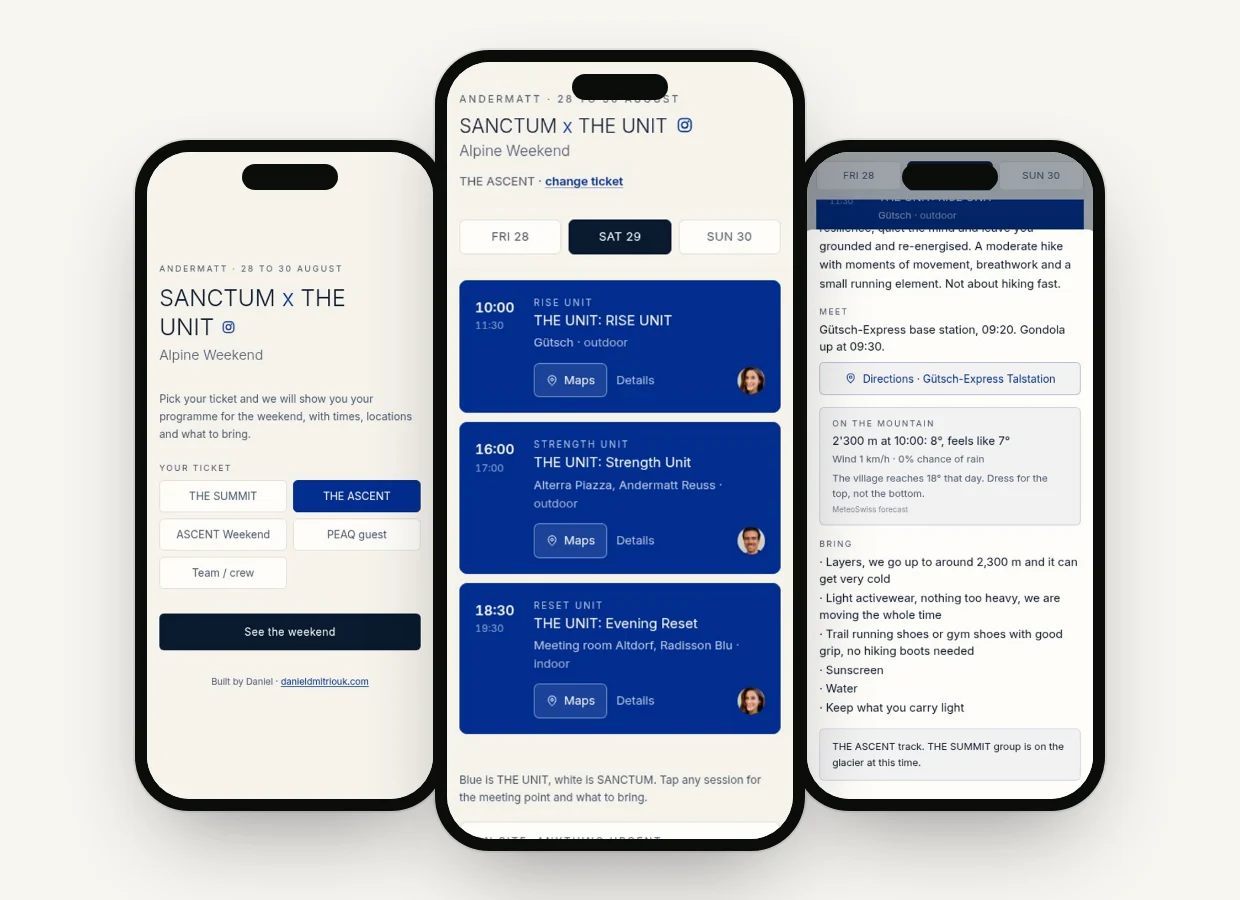
Pick a ticketYour own planDetails & weather
For the Alpine Weekend in Andermatt I copied the whole schedule out of the organiser's email and pasted it into Claude. The brief came in at 10:00 and the app was live at 16:00. Every guest saw only their own sessions, with the place, a Maps button and the live weather. Here is the prompt, rewritten so it works for your event.
Get the prompt ↓
Copy the prompt and fill it in. Paste your whole schedule where it says so, exactly as it is in the email. Add the name, place and dates.
Paste it into Claude. Claude reads the schedule, asks you every open question in one go, then builds the app.
Put it online and send one link. Claude shows you how to put it online for free, for example by dragging it onto Netlify Drop. Send the link to every guest.
Claude (claude.ai or Claude Code) and your schedule as text. No coding. Your guests install nothing: they open the link and add the app to their home screen, on iPhone and Android.
Build me a simple event web app that my guests open from one link on their phone. I am not technical, so explain every step in plain English.

Here is my event schedule, copied straight from the organiser's email:

[PASTE YOUR WHOLE SCHEDULE HERE: every session with the day, start and end time, place, and which ticket or group it is for]

Event name: [EVENT NAME]
Town or venue (for the weather): [TOWN]
Dates: [DATES]
Accent colour: [YOUR BRAND COLOUR, or "you choose"]

What the app must do:

1. Start screen: the event name, the dates, and one button per ticket type. The guest taps their ticket once and the app remembers it on their phone. A small "change ticket" link lets them switch.

2. After that, show only that guest's sessions, with one tab per day. During the event it opens on today's tab.

3. Every session is a card with the start and end time, the title, the place, and whether it is indoor or outdoor.

4. Every card has a "Maps" button that opens the place in the phone's maps app, and a "Details" button that opens a sheet with the meeting point, what to bring and any notes from the schedule.

5. Live weather from Open-Meteo (free, no key needed): the temperature now and a short forecast for each event day, plus one line on what to wear. Show it only when the forecast covers the event days, hide it otherwise.

6. It must look clean and premium on a phone: big buttons, easy to read, no clutter.

7. Guests can "Add to Home Screen" on iPhone and Android and it opens like a real app with its own icon. Add a short tip at the bottom that explains how. iPhones need a PNG icon (180 x 180): if you cannot make one, tell me the easiest free way to make it.

8. No login, no database, no build step. Keep it to one index.html (plus an icon and a manifest file only if they are needed), all in one folder I can drag onto a free hosting page.

Before you build anything, read my schedule and list everything that is unclear or missing (for example a session without a place, or a ticket type with no sessions). Ask me all of those questions in one message, then build it.

When it is done:
- Give me the files.
- Tell me in 3 short steps how to put it online for free and get one link to send my guests (for example Netlify Drop: go to app.netlify.com/drop, drag the folder in, then create a free account so the link stays online).
- Tell me how to change a session later: I tell you what moved, you give me the updated files, and I drag them in again. The link stays the same.
Only your programme. The guest taps their ticket once. After that they only see their own sessions, one tab per day.
Where to go and what to bring. Every session has a Maps button and details: meeting point, what to bring, notes.
Live weather. Free weather data from Open-Meteo, with one line on what to wear. No signup, no key.
If something changes during the event, tell Claude what moved and upload the new file again. The link stays the same. That is how a moved session was live for everyone in 40 seconds at ours.
Got an idea for your business and wondering if AI can do it? Tell me about it in a short, free call.